Total Value
How much value do you have altogether?
$25 + $25 = $50 totalYour math can be right while your rate choice is wrong. Check the denomination printed on each card—not only the total you added.
You have two $25 gift cards.
The math is simple:
$25 + $25 = $50
But when you check the trading rate, those two cards do not automatically become one $50 gift card.
That distinction matters.
The total value you own and the denomination of each card are two different things. If you have two separate $25 cards, you should check the rate for the $25 denomination, not simply use the $50 rate because the total adds up to $50.
Imagine you have:
Together: $25 + $25 = $50. So your total face value is $50.
But your actual cards are still 2 × $25 gift cards. You do not suddenly have 1 × $50 gift card.
That difference can affect which rate or category you should check before trading.
How much value do you have altogether?
$25 + $25 = $50 totalWhat value is printed on each individual card?
Card A = $25 · Card B = $25These two terms answer different questions. Total value tells you how much value you have altogether. Denomination tells you the value of each individual card.
In the same example, Card A is $25 and Card B is $25. So even though the total is $50, the denomination you are holding is still $25 per card.
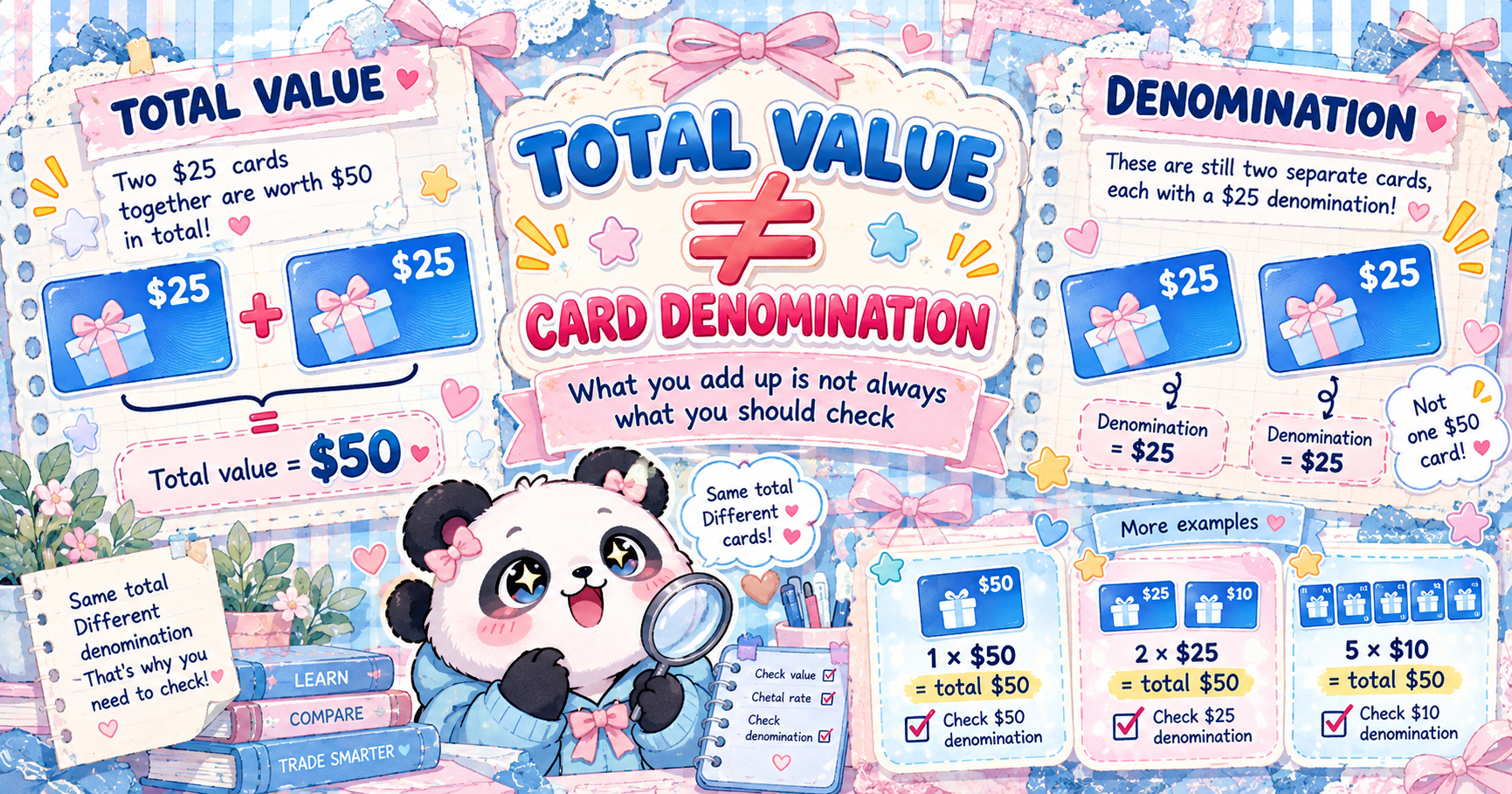
Select each card setup. The total stays the same, while the denomination ticket changes.
Gift card rates may differ depending on details such as:
That means a $25 gift card and a $50 gift card should not automatically be treated as the same trading option. Even if they belong to the same brand and country, the available rate for one denomination may not always match another.
For a quick explanation of fixed and variable card values, keep this PDCard guide nearby as you compare rates →
So if the cards in your hand say $25, check the available $25 rate.
A user has 2 × $25 gift cards, then sees $50 Gift Card — Rate X and thinks: “My two cards add up to $50, so this must be the correct rate.”
But the rate shown for a $50 card refers to one card with a $50 denomination. Your cards are still $25 + $25. They may total $50, but they are not one $50 card.
If the selected details do not match the card you uploaded, review PDCard’s mismatch guide before continuing →

| What You Have | Total Face Value | Denomination to Check |
|---|---|---|
| 1 × $50 card | $50 | $50 |
| 2 × $25 cards | $50 | $25 each |
| 5 × $10 cards | $50 | $10 each |
All three examples equal $50 in total, but they are three different card setups. That is why total value alone is not enough when checking the correct rate. For multiple-card submissions, PDCard’s guide to submitting each card correctly is a useful next check →
Before looking at the total amount, look at each card individually.
To separate face value from final payout, read this short PDCard explanation before you submit →
Make sure you are checking the correct gift card brand.
The same brand may have cards from different markets.
Physical cards, e-codes, or different product versions may use different categories.
Look at the actual amount of the card you are submitting. If the card says $25, check the rate for a $25 card.
Gift card rates can change, so check the current available rate before you submit.
Read the cards in each round, then choose the denomination category that matches them.
Selecting the correct denomination helps your submission match the actual gift card you are trading. A mismatch between the selected amount and the card you upload may create unnecessary confusion during review.
Before submitting, make sure the following details match your card:
The rate should follow the card you have, not the total you calculated from several cards. Before you send the trade, use PDCard’s card-identification checklist for one final look →

2 × $25 cardscheck the $25 rate
1 × $50 cardcheck the $50 rate
5 × $10 cardscheck the $10 rate
The totals may be equal. The denominations are not.
Two $25 gift cards can give you $50 in total face value, but they are still two individual $25 cards.
Before trading on PDCard, check the brand, country, card type, actual denomination, and today’s available rate. Then submit each card under the category that matches what you actually have.
Same total value does not always mean the same trading category.